
What's the Difference Between JSON and XML?

JSON vs XML: 2026 Guide to Choosing the Right Data Format for APIs and Data Exchange 🚀
When comparing JSON vs XML in 2026, most developers immediately think of speed, readability, and API compatibility. JSON has become the default for modern web and mobile applications, while XML still powers complex enterprise systems, documents, and legacy workflows. But why does JSON dominate new APIs? And when should you still use XML?
This guide goes beyond surface-level differences to help you understand the practical impact of each format—performance, schema validation, use cases, developer experience, and real-world scenarios like REST, SOAP, GraphQL, and gRPC.
Along the way, you'll also find examples, benchmarks, and decision criteria to help you choose the right format for your application.
Quick Summary Table: JSON vs XML
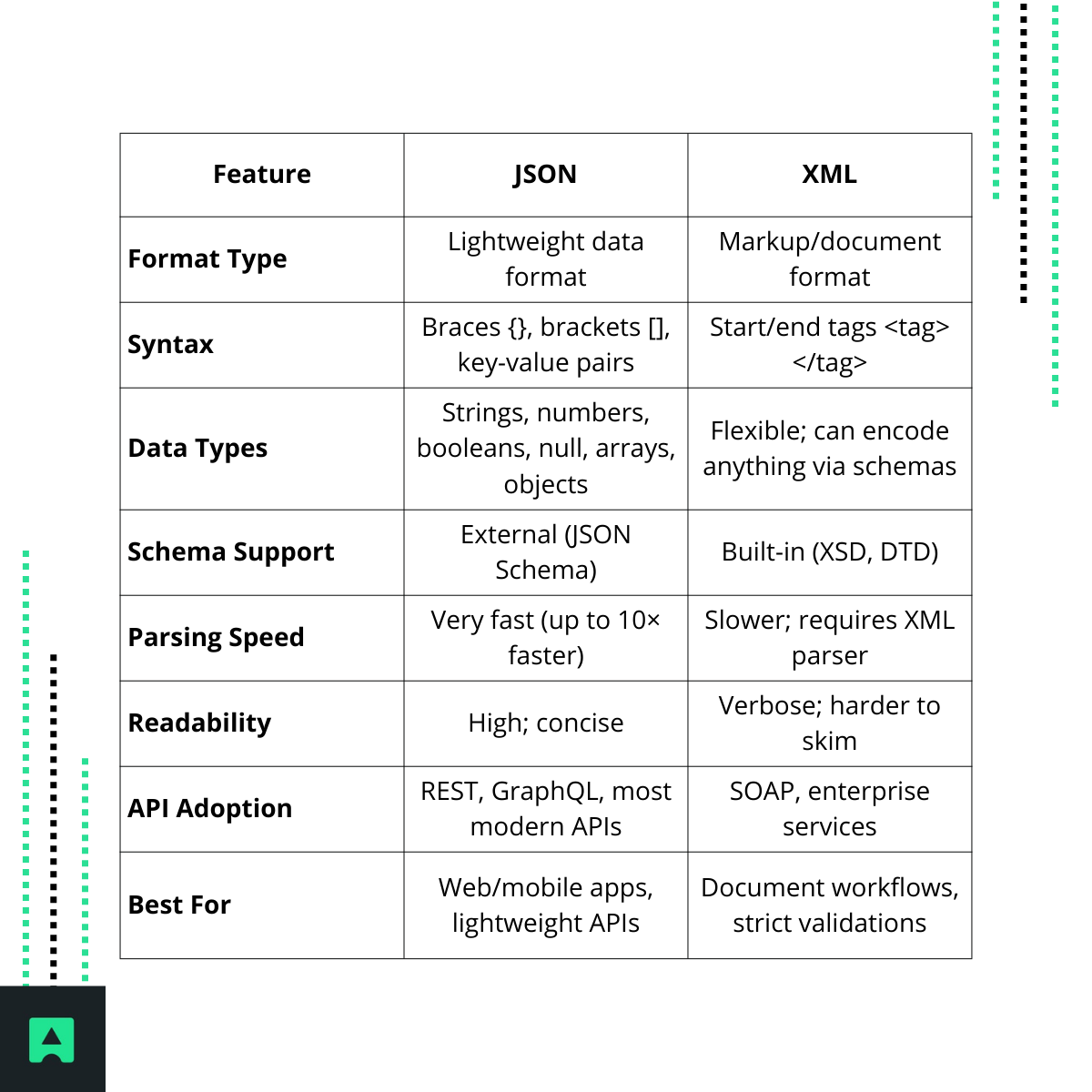
Introduction: JSON vs XML in Modern APIs 🌐
Two formats—JSON (JavaScript Object Notation) and XML (Extensible Markup Language)—have shaped data interchange for over two decades. XML was the backbone of early web services (SOAP, RSS, XHTML), offering structure, namespaces, and strict schema validation. With the rise of REST APIs and JavaScript-heavy applications, JSON became the dominant format thanks to its simplicity, small payload size, and native JavaScript support.
In 2026, JSON still powers most modern APIs, including REST and GraphQL, while XML remains essential for enterprise integrations, document-centric workflows, and systems that rely on schemas.
This article will help you decide which format fits your project best—backed by examples, practical tips, and current industry insights. If you're working with REST APIs, you can also explore tools like the
What Is XML? 🧩
XML (Extensible Markup Language) is a flexible, text-based markup language designed to store hierarchical data. It uses self-describing start and end tags, similar to HTML, and supports namespaces, comments, and validation through schemas (XSD/DTD).
Example XML snippet:
<note>
<to>Alice</to>
<from>Bob</from>
<message>Hello from XML!</message>
</note>
Key Characteristics:
- Tag-based structure (verbose but explicit)
- Support for namespaces, comments, and metadata
- Optional validation via XSD or DTD
- Ideal for document markup, SOAP messages, configuration files, and ecosystems like Java's Maven (pom.xml)
XML's extensibility and strict schema capabilities make it ideal when data correctness and structure enforcement are critical.
What Is JSON? ⚡
JSON (JavaScript Object Notation) is a lightweight, language-agnostic data format expressed as key/value pairs using {} and arrays using []. Although derived from JavaScript, it is supported by nearly every programming language.
Example JSON snippet:
{
"name": "Alice",
"age": 30,
"message": "Hello from JSON!"
}
Key Characteristics:
- Compact, clean syntax
- Native parsing in JavaScript (JSON.parse)
- Common in REST APIs, config files (package.json), and NoSQL databases
- Easy to read, write, and debug
JSON integrates naturally with the modern web ecosystem.
Syntax and Structure Comparison (with Examples) 🔍
Let's compare JSON vs XML using the same data.
Employees in JSON:
{
"employees": [
{ "name": "Alice", "role": "Engineer" },
{ "name": "Bob", "role": "Designer" }
]
}
Employees in XML:
<employees>
<employee>
<name>Alice</name>
<role>Engineer</role>
</employee>
<employee>
<name>Bob</name>
<role>Designer</role>
</employee>
</employees>
Why it matters:
- JSON is shorter, reducing payloads.
- XML uses tags that make data more explicit, useful in document workflows.
- JSON has native arrays, whereas XML uses repeated elements.
Comments, Namespaces, and Metadata 📝
| Feature | JSON | XML |
|---|---|---|
| Comments | ❌ No native comment syntax | ✅ Supports <!-- comments --> |
| Namespaces | ❌ Not supported | ✅ Built-in namespace support |
| Inline metadata | Limited | Extensive via attributes + tags |
If you need comments or strong metadata management, XML may be the better fit.
Data Types and Schemas 🧪
JSON Types:
- string
- number
- boolean
- null
- array
- object
XML Data:
- XML can represent virtually anything—including binary, through encoding—and provides XSD/DTD schemas for strict type enforcement.
Validation Differences:
- JSON Schema is flexible and modern—but not part of the core JSON spec.
- XML Schema (XSD) is built-in, well-established, and widely supported.
Readability and Verbosity 🧠
JSON is typically easier to skim and write due to its minimal syntax. XML's verbosity, while sometimes seen as a drawback, comes with benefits: clarity in hierarchical documents, self-describing tags, and rich metadata.
Payload Size Example:
JSON often produces files 30–60% smaller, improving:
- API performance
- Mobile data efficiency
- Load times
Parsing and Performance ⚡ Speed Matters
Parsing performance is one of the biggest differences.
- JSON parsing is extremely fast—Microsoft benchmarks show it can be up to 10× faster than XML.
- XML parsing requires specialized parsers like DOM, SAX, or StAX.
- Smaller JSON payloads lead to faster transmission and lower memory overhead.
If you're building a high-throughput REST API, JSON is nearly always the more efficient option. You can test response times using tools such as the AbstractAPI IP Geolocation API, which returns fast JSON payloads.
Security Considerations 🔐
XML Risks:
- XXE (XML External Entity)
- Billion Laughs (entity expansion)
- Misconfigured DTDs
JSON Risks:
- JSONP can cause CSRF if misused
- Less attack surface overall
AWS and other sources often conclude that JSON is generally safer for API communication, though both require proper validation.
Language and Tool Support 🛠️
Both JSON and XML enjoy excellent support, but JSON has become the default in most toolchains.
JSON Native Support:
- JavaScript: JSON.parse()
- Python: json module
- Java: Jackson, Gson
- Go: encoding/json
- PHP, Ruby, .NET, Swift… all out of the box
XML Support:
- DOM/SAX parsers in nearly every language
- Libraries like xml.etree.ElementTree (Python), JAXB (Java)
- Required for SOAP toolkits
JSON tends to integrate more seamlessly into modern frameworks.
Use Cases: When JSON vs XML Is Best 🧭
JSON is best for:
- Web & mobile apps
- REST APIs
- Real-time services
- JavaScript-heavy frontends
- Lightweight configurations (package.json, .eslintrc)
- NoSQL systems like MongoDB
XML is best for:
- Enterprise systems with strict schemas
- SOAP web services
- Document formats (RSS, Atom, SVG, Office files)
- Configuration in Java/.NET ecosystems
- Workflows requiring namespaces or metadata
Decision Checklist: Which Should You Use? ✔️
Choose JSON if:
- You want fast parsing and small payloads
- Your API is REST-based
- You need developer-friendly, human-readable data
- Your clients run on JavaScript
- You prioritize performance
Choose XML if:
- You require powerful validation via XSD
- Your system uses SOAP or older enterprise protocols
- You need namespaces, comments, or complex metadata
- You're handling document-focused data
Example: cURL Request to a JSON API (AbstractAPI) 🔧
curl "https://ipgeolocation.abstractapi.com/v1/?api_key=YOUR_API_KEY&ip_address=8.8.8.8"
Response (JSON):
{
"ip_address": "8.8.8.8",
"city": "Mountain View",
"country": "United States"
}
You can try this using the AbstractAPI Geolocation API.
Summary / Conclusion 🏁
JSON and XML each have strengths:
- JSON → faster, smaller, more readable, perfect for modern APIs.
- XML → more expressive, schema-rich, and ideal for document-heavy or enterprise contexts.
Instead of asking "Which is better?", ask:
Which format fits my use case, performance needs, tooling, and clients?
For most new APIs in 2026, JSON is the natural choice. But XML remains indispensable for systems requiring strict structure and extensive metadata.
Frequently Asked Questions
What is the main difference between JSON and XML?
JSON uses a compact key-value pair structure, while XML represents data using a tag-based hierarchy similar to HTML. JSON is generally smaller and faster to parse, making it the default choice for most modern REST APIs and web applications.
Is JSON faster than XML?
Yes, JSON parsing can be up to 10× faster than XML according to Microsoft benchmarks, and JSON payloads are typically 30 to 60% smaller. This performance advantage makes JSON the better fit for real-time services and high-traffic APIs where response size and parse speed matter.
When should you use XML instead of JSON?
XML is the right choice for enterprise systems that require strict schema validation via XSD or DTD, SOAP web services, and document-centric workflows such as Office file formats, SVG, RSS, and Atom feeds. It also suits legacy integrations where XML is already the established standard.
Does JSON support comments?
No, standard JSON does not support comments. If you need inline documentation within a data file, XML lets you add comments anywhere in the document. Some JSON-based configuration formats like JSONC work around this limitation for config files, but it is not part of the JSON spec.
Which format is more secure: JSON or XML?
JSON has a smaller attack surface by default. XML parsers are vulnerable to specific attacks such as XML External Entity (XXE) injection and entity expansion (billion laughs) attacks, which require explicit mitigation in your parser configuration. JSON parsers do not expose these vectors, making JSON safer to work with out of the box.
Which format should I use for a REST API?
JSON is the standard for REST APIs. It integrates naturally with JavaScript frontends, is natively supported by browsers, and produces lighter payloads than XML. XML is still used in SOAP-based services, but for any new REST or GraphQL API, JSON is the practical default.
CEO at Abstract API

